With all of the tasks that go into starting a business, it is easy to forget about properly collecting customer data correctly from the beginning.
Life in a startup business is hectic, after all, with thousands of tasks vying for your attention — everything from critical things like delivering your product or service to operational responsibilities like hiring, bookkeeping and vendor management.
And since you don’t have a lot of customers and prospects in the beginning, keeping them organized often falls by the wayside -– similarly to the way some startups fail to establish a solid financial model because they don’t expect to have much revenue in the beginning.
Lead Management BasicsResist the Spreadsheet Temptation |
Data Hygiene Bonus Points
|
What I have seen many times, and suffered through personally at least once, is that if you don’t take time to establish some sound data collection and lead management practices up front, you may not get around to it until it really becomes a problem for your business. By that time, you could have lots of neglected leads and ignored, angry customers (or maybe no customers).
If you think these suggestions may not apply to your cool “viral” consumer startup that is the next Facebook or Uber for Dog Walkers, well, you could be right if you are really lucky.
However, you can still use these guidelines to organize data on partners, advisors, investors, etc. For the 99.9% of businesses that will need to actively sell to prospects and customers, however, these guidelines are important!
Lead Management Basics
 |
Resist the Spreadsheet Temptation
If you must use Excel or Google Sheets for customer or lead data, be sure to do it with a vision for the future. We all do this sometimes, but a little structure and preparation can save time and headaches.
Think about what data you might want later, and keep it clean with clearly labeled, consistent columns that each contain one type of data only. That way you can easily import it into a CRM system later, without further data entry or cleanup. The relatively new pre-built Tables options in Google Sheets can help you get started on the right path, since they have validation and smart chips built in.
Keep in mind that your use of spreadsheets should only be used very temporarily though, as they are “flat files” — you cannot easily have different records related to a line in a spreadsheet, so keeping track of emails, phone call logs, or other activity is difficult. For managing communications, you really need a CRM system.
Connect Forms to a Database
Make sure contact forms on your web site are going into a database of some sort (like a CRM system below). It is amazing how many companies do not respond to inquiries through their web site forms, despite this being effectively the same as throwing away money you spent on your website and marketing.
If you have a contact form that just sends an email to someone, it is easy to see how it might get lost (or worse yet ignored, hoarded by a sales rep who is too busy to respond but doesn’t want to share, etc.). And any lead database should easily be accessed by the people who need to follow up with leads (not hidden in your website’s back end system).
 |
Publish Email Addresses with Caution
Email addresses on websites can be ok, but know what you are getting into. Putting an email address on your contact us page goes against much of the advice here around databases / CRM systems, but it can make for a more personalized touch. Just expect to get a lot of spam at that address, and be prepared to triage more uncategorized inquiries.
Public email addresses can be helpful for certain audiences who don’t like filling out forms, or for marketing purposes (e.g. “contact [email protected]”.) Just be sure that you are prepared to deal with these emails, and have clear expectations around who will answer these emails and how they will be handled.
A best practice is to enable a tool like email-to-case, a Salesforce feature that can receive emails and create cases from them automatically. With that type of technology, each email logs a case or ticket in Salesforce, so nothing falls through the cracks. Customers can conveniently just pop you an email, but on the CRM backend a record gets created in a similar way to a form (with less structured data so some cleanup may be required).
 |
Use a CRM System
Use a Customer Relationship Management (CRM) system as early as possible. Waiting too long leads to disorganization and missed opportunities.
Of course we recommend Salesforce.com, though there are plenty of other options. CRM systems can be expensive for an early stage business, but they do wonders for your business in terms of centralizing and organizing data.
You can make your forms enter data directly into Salesforce via it’s web-to-lead feature, eliminating data getting lost in someone’s email. See our Ultimate Guide to Salesforce Web-to-Lead Forms post for an in-depth discussion.
Once the data is in a CRM system, it is also much easier to begin to define processes for following up with and managing the relationship with those customers or leads (hence the name CRM, customer relationship management), and some of this can even be automated through autoresponders, automation rules, etc. Plus systems like Salesforce scale with your business regardless of how quickly you grow, offering features for almost every future need.
Finally, if you can convince everyone to use a central CRM system, you get a more complete picture of trends with leads and customers instead of having to ask around to different sales representatives, consultants, etc. This is valuable even if everyone is in the same room, but is more important with many businesses today that have remote, distributed teams.
Integrate with Other Tools
Another reason to begin using a CRM system like Salesforce is that you can integrate your CRM with marketing, sales, and customer service tools to have a seamless flow of data.
Using disconnected tools without integrating them can lead to siloed data, more manual work, and inefficiency. To track your customer journey correctly, you need to be able to see what your customer is doing through multiple channels, from marketing to customer service.
Plus from a practical perspective, not having your tools connected together can make it difficult to do things like keep your email marketing lists up to date with the latest leads, or provide timely assistance to new customers during their onboarding process.
Capture Lead Marketing Data
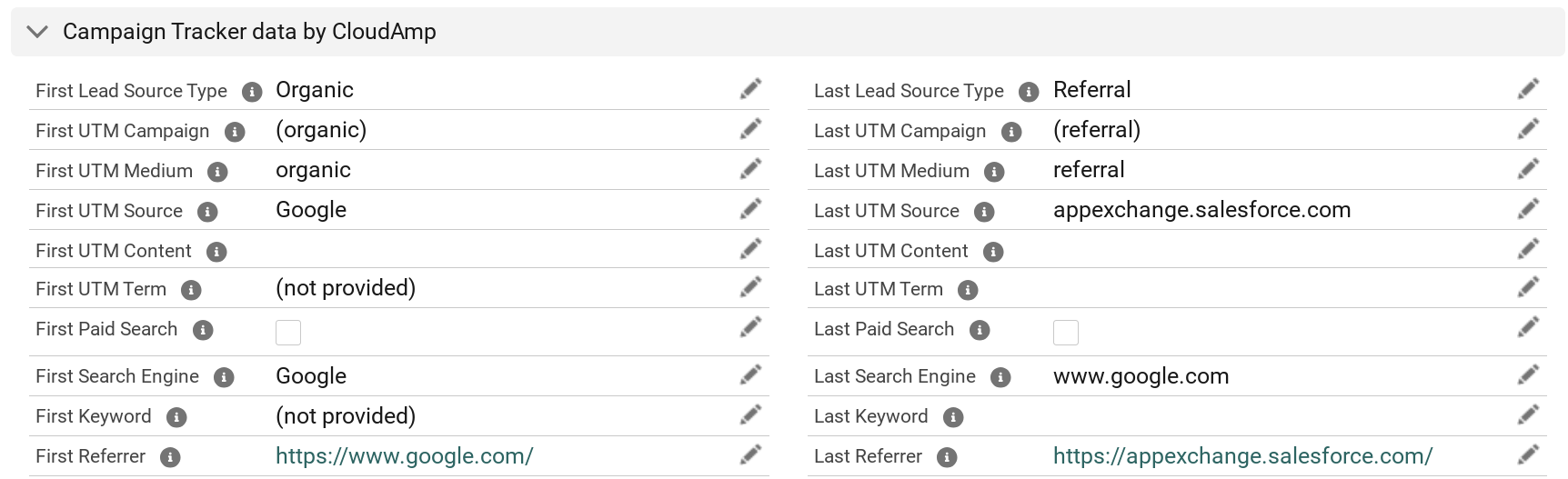
One type of CRM integration are attribution tools, which can capture marketing data into Salesforce. You can see precise lead paths — how a visitor arrived at your website, the keywords they searched for, and what ad campaign they responded to.
Using an app like our CloudAmp Campaign Tracker, you can see all of the information about how your leads found you. Know which sources, campaigns, and content drove each particular lead, so you can understand marketing ROI as your leads convert to sales.
In addition, you can see which pages on your website a lead visited before they submitted a web form. This information can often be useful to understand buyer intent or product interest.
 |
Data Security is Important
Ensuring the protection of you and your customers’ sensitive information is critical, though it may seem like a luxury to focus on when you are trying to launch a business. As you grow, data breaches can become a big risk. And you will need to make sure you comply with data privacy laws (GDPR, CCPA), especially if you are dealing with consumers.
One important benefit of using a CRM system recommended above is data security — encryption, password protection, and not emailing around spreadsheets. Plus using a CRM system forces you to begin to define who can access or modify data, to ensure accountability but also prevent unauthorized access or changes.
Data Hygiene Bonus Points
 |
Copy and Paste, Don’t Type
Train your team to copy / paste instead of doing data entry. I don’t want to sound like a high school grammar teacher, but making sure people get into the habit of copying and pasting data from emails or websites, instead of retyping, is critical, especially when it comes to email addresses.
Typos with gmail rarely bounce to let you know you typed it wrong, one of the other 1.8 billion users with a similar address gets your email and just deletes your proposal since they have never heard of you.
There are a variety of extraction tools which can automate data entry from email signatures and websites these days, which is even better than copy and paste. And if you follow the earlier recommendation to connect your forms to a database, you shouldn’t need to do much data entry, because most of your contacts will already be in your CRM system.
Standardize Data Formats
Establish standards for your team about how names, phone numbers, and other common information should be formatted to improve the quality of your data. Automated tools can make sure CA, Calif, and California all get rewritten to CA, but other bad data can live forever.
Bad data can hinder retrieval and analysis, and require a lot of wasted time on manual cleanup to make reports and dashboards look correct. And data cleansing tools can only do so much.
Avoid Placeholder Data
Related to standardizing formats, your team should not put anything in your database that does not belong. If your team isn’t capturing data for required fields, so they are entering BS to be able to save records, review the process to either help them get the required information, or consider making a field not required.
As you grow, the notes that you put in a field where they didn’t belong (“customer is a real cheapskate”) or substitutes for information you did not know (last name = “don’t know”) will come back to bite you.
When you are larger and have so much data that you can’t easily manually review it for accuracy, your IT department will magically enable customers to update their data in an account portal (like Salesforce’s great Experience Cloud). The “cheapskate” may see those notes that were not in a private notes field and be unhappy. Or your marketing department may send out beautiful, personalized email newsletters addressed to “Dear Bob Don’t Know.” Keep your database clean.
 |
Train and monitor your SDRs
If your company has Sales Development Representatives (SDRs) or Business Development Representatives (BDRs), or any type of inside sales representatives who are responsible for qualifying leads, be sure to train them on these data hygiene standards. In many organizations, they are the front lines of handling incoming leads in Salesforce.
So in addition to your typical measurement of how many emails, calls and scheduled meetings these sales reps are handling, you should not just establish data policies but also monitor how they are processing lead data.
- Are they converting leads from existing customers correctly?
- Are they deduping records (if you are not using automated tools for this)?
- How are they handling leads or contacts who are no longer at a company?
- Are they following standards for updating or correcting data?
- If they have delete permissions, are the deleting things that should be deleted?
Ensuring that your team who interacts the most with leads and customers is helping to clean the data, rather than ignoring your policies or worse polluting your database can be vital to building good data quality over time.
 |
Clean your Data
Last but not least, you should conduct regular data cleanups of your database or CRM. Duplicates, inaccuracies, or irrelevant data are inevitable in any database, and generally become worse over time.
Failure to periodically update and dedupe your data can lead to inefficiencies, and make it harder to extract insights through your reports. And from a marketing perspective, outdated and duplicate data leads to poor targeting, and wasting resources on dead or unqualified leads.
A few common techniques for cleaning data include:
- Lead and Contact Deduplication tools for Salesforce
- Having a clear policy about how to update records who have changed jobs
- Syncing hard bounce / unsubscribe data from your email marketing system back to Salesforce